
I started by inspecting a saved Kinect frame, then made the viewer follow a connected sensor. Once I could look around the live point cloud, I had another question. How could I tell what had changed since I took a reference?
Depth colors help me read the shape of the room, but I still have to remember where things were. I added a reference to Kinect Lab so I could capture the room once and compare each new frame with that view.
A reference for each ray
I keep the Kinect and the scene still while the application collects 30 rectified depth frames. Rectification corrects for lens distortion so each pixel in the resulting grid corresponds to a viewing ray. For each pixel, the reference code gathers the valid depths from those frames. It sorts them and takes the middle value, averaging the two middle values when there is an even number. A few stray readings have less influence on that median than they would on an average of all the readings.
I need at least 20 valid readings at a pixel to keep a reference depth there. The projection code defines a valid depth as finite and greater than 1 mm. The reference keeps one depth per pixel where it can and releases the 30 input frames when it finishes. If something stays in view for most of the collection, its depth can become part of the reference.
The same pixel in a new frame looks along the same ray as before, provided the Kinect stays in place. In Rust, I keep the pixel index while projecting the current frame into 3D and use it to look up the reference depth. The browser subtracts that depth from the current point’s Z coordinate, with both values in millimetres. That’s a difference in depth along the camera’s Z axis. The two surfaces can be different things. A box placed in front of a wall gives me a nearer depth on those rays. Moving the box out of a spot it occupied in the reference can expose a farther surface.
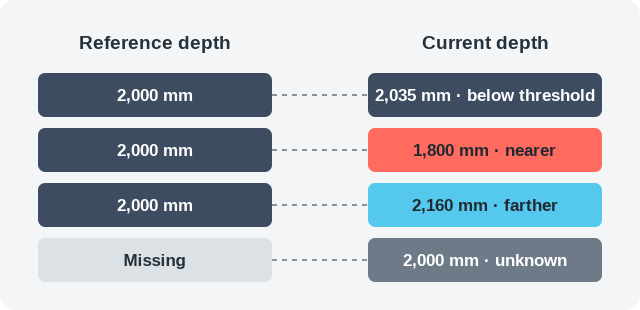
Each row compares one pair of depths. These are illustrative values at a 100 mm threshold.
In Changes mode, coral means the current surface is nearer by at least the threshold, and cyan means it’s farther away by at least that much. Smaller differences stay dark. The slider starts at 100 mm and goes from 20 to 500 mm in steps of 10.
A missing reading tells me that I have no usable depth for that pixel in that frame. Without a usable current depth there is no point to draw. With a current point but no reference depth, the viewer draws the point in gray and leaves it out of the comparison. If there are no comparable points, the viewer reports that the comparison is unavailable. A count of zero means I had comparable points and none reached the threshold.
What the count picked up
With the Kinect in place, I moved an object and held it still during a hardware check. At the 100 mm threshold, the browser recorder started at 6 flagged points out of 154,105 comparable points. Its highest sample had 34,252 out of 151,688. The reference held depths for 155,136 pixels throughout. The comparable count changed because a pixel also needed a usable current depth.
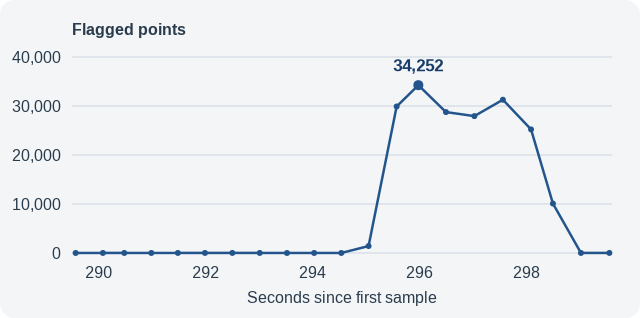
The final ten seconds of a roughly five-minute browser record. Each dot is a sampled count at the 100 mm threshold, roughly half a second apart.
The last two samples in the plot were 11 and 12. When I checked the live view again outside that recording window, it showed 26,720 flagged points. The recorder kept counts and bounds, with no video or timestamps for the individual gestures, so I can’t tie the peak or the dips to a particular movement. The count includes every comparable point whose depth differs by at least 100 mm, including any changes elsewhere in the room.
Holding still doesn’t make a difference fade. If I put the box down in a new spot, those depths can still differ from what I captured. Once I move the Kinect itself, I need a fresh reference because the rays now look at different parts of the room.
Keeping the reference with its capture
Stop leaves the last cloud and its comparison on screen. Starting again clears the old reference. The live packet carries both a capture ID and a reference ID, so the viewer can reject a delayed frame whose IDs don’t match the active capture and reference. The packet carries the reference depth directly, and the browser calculates the difference from the displayed point’s Z. The live protocol changed here. The snapshot and PLY formats stayed the same.
What I measured on the live path
In a Release probe against the real sensor, the reference was ready 2.60 seconds after acquisition started. That includes waiting for frames and processing them. Adding the 30th frame and finishing the median calculation took 33.7 ms. The reference in this run covered 155,017 of the 217,088 pixel positions.
For the next 60 frames, I timed projection with the reference lookup at 1.09 ms median and 1.61 ms at the 95th percentile. Encoding the live packet took 2.33 ms median and 2.76 ms at the 95th percentile. Those two timers started after acquisition and stopped before any browser work.
In a separate 60-second Release run with Changes mode active, the server published 15.0 clouds per second and the browser recorder counted 7.81 distinct cloud updates per second. I didn’t measure GPU drawing time or sensor-to-screen latency.
The live viewer article has faster publication rates from earlier, short API runs. A 15-second run of the previous commit in the same session as the new measurements also came in at about 15 publications per second. I can report the lower rate I saw that day, but the runs leave its cause open.
I can still orbit the cloud to make sense of an unfamiliar shape. With Changes on, I know where to start looking even after the room has gone still.
Comments, questions, or just a reaction?
Send an email to ~bounga/bounga.org-discuss@lists.sr.ht. It is public and archived, so other readers can follow along and answer too.