
I recently wrote about revisiting my Doom configuration. I also got Emacs Everywhere working on my Mac: select text in a browser field, edit it in an Emacs frame, then send the result back.
A macOS setup shared in the project’s issue tracker uses Hammerspoon. I used Apple’s built-in Shortcuts app for the launcher and keyboard binding. My successful test was a GitHub comment field in Safari: the edited text returned to the field, without submitting the comment.
This is my tested Doom setup with Homebrew Emacs Plus 31, specifically Emacs 31.0.91. The launcher was small; getting it to find my running server and giving Emacs the right permission took more attention.
Enable the Doom module
In ~/.config/doom/init.el, enable everywhere under :app in the existing
doom! block. Then synchronize Doom and restart Emacs:
~/.config/emacs/bin/doom sync
Emacs must already be running with its server active. Use
M-x server-start if needed. This launcher does not start Emacs for you.
The Doom module documentation describes the integration;
in the version I tested, doom +everywhere calls
emacsclient --eval '(emacs-everywhere)'.
Build the shortcut
Open Shortcuts, create a shortcut named Emacs Everywhere, and add a Run Shell Script action. Choose bash, leave the action’s input variable unset, and keep Run as Administrator off. With no input, the Pass Input setting does not matter.
Paste this script, adapting the absolute Doom path on the last line:
export LANG=en_US.UTF-8
export LC_ALL=en_US.UTF-8
export EMACS_SOCKET_NAME="$(/usr/bin/getconf DARWIN_USER_TEMP_DIR)emacs$(/usr/bin/id -u)/server"

/Users/nico/.config/emacs/bin/doom +everywhere
The locale exports addressed a warning I encountered with en_FR.UTF-8.
The socket export addressed a more confusing failure: the command worked
in Terminal, but Shortcuts reported that emacsclient could not find the
socket even though my server was running.
getconf DARWIN_USER_TEMP_DIR obtains my account’s temporary directory;
id -u supplies its numeric user ID. Together they locate the default
macOS socket without hardcoding a /var/folders/... path.
EMACS_SOCKET_NAME tells the client which socket to use.
If you customize server-name or server-socket-dir, adapt the expression.
I reproduced the lookup failure with a different TMPDIR and confirmed
that the explicit socket fixed it. I did not inspect Shortcuts’ own
environment, so that test does not establish its exact difference from
Terminal.
Open the shortcut’s Details panel (ⓘ), choose Add Keyboard Shortcut,
and press Control+Option+Command+E (⌃⌥⌘E). This combination worked in
my setup; check for conflicts in yours. Apple’s keyboard shortcut
instructions describe the same binding mechanism.
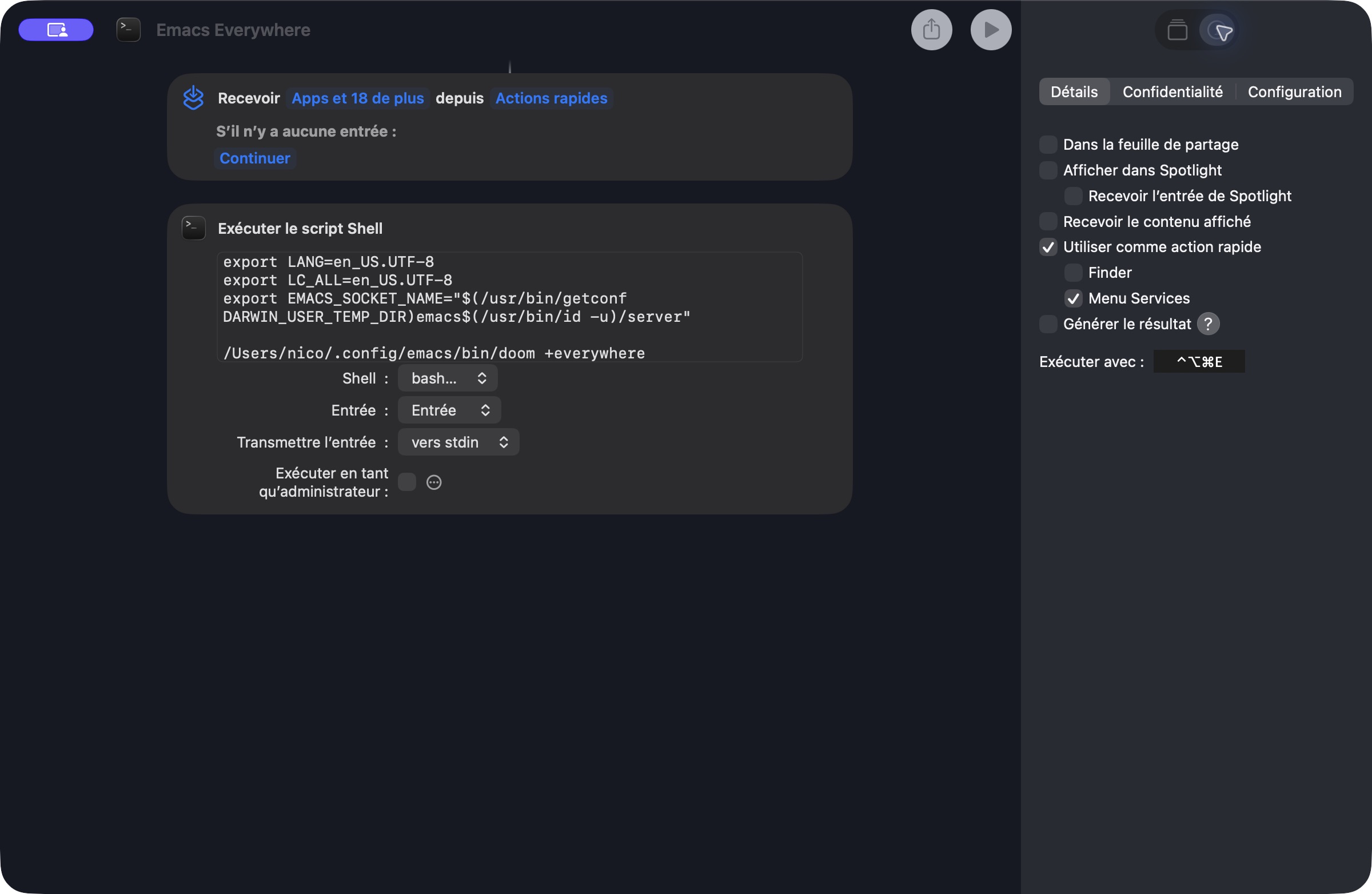
My macOS interface is in French. “Exécuter le script Shell” is Run Shell Script, and “Détails” is Details. The shortcut receives Quick Action input, but the shell action has no input variable: Emacs Everywhere handles the selected text itself.
Allow Emacs to control the source application
In System Settings → Privacy & Security → Accessibility, add and enable the Emacs application you actually run. This is the macOS permission for controlling other applications.

Allow Emacs to control other applications in Privacy & Security → Accessibility. The screenshot shows the enabled entry in my French UI.
An enabled entry was not enough in my case. I removed it, added the current
Homebrew application again, and fully restarted Emacs. The tested app was
/opt/homebrew/Cellar/emacs-plus@31/31.0.91/Emacs.app.
Before that, I saw errors with codes -25211 and -1719, meaning that
osascript was not allowed assistive access. Re-adding Emacs resolved the
permission problem; I did not establish why the earlier entry failed.
A Homebrew upgrade may require granting this permission again. On my Mac,
/Applications/Emacs.app already links through
/opt/homebrew/opt/emacs-plus@31/Emacs.app, but Finder resolves it to the
versioned application when I add it. I would not rely on that symlink to
preserve permission. I upgrade Emacs infrequently and chose to re-add it
when necessary.
Select the text before launching
This was the missing step in my first attempt: select the source text. Putting the caret in the field was not enough. Without a selection, my installation imported the existing clipboard contents, including a path I had copied earlier.
For a first test:
- Click inside an editable text field in Safari and enter some text.
- Press Command+A inside that field to select its contents, then ⌃⌥⌘E. I did not need a separate Command+C.
- Actually change the text in the Emacs frame, then finish with C-c C-c. The edited text should return to the original field.
Use C-c C-k to cancel without pasting back. In the installed version, an unchanged buffer is also treated as an aborted session, so opening and immediately closing it does not test the return path.
If the frame title contains an AppleScript error
I also encountered this where the application or window name should have appeared:
script error -1758. Couldn't get error text because of error -1700.
The installed package compiled its helper scripts with
osacompile -r scpt:128 -t osas, producing legacy resource-fork scripts.
osadecompile rejected those files with
errOSADataFormatObsolete (-1758). Newly compiled data-fork scripts were
readable. Rewriting the existing file’s data fork alone did not repair it:
the obsolete resource fork remained. Replacing the file did.
The GitHub source checked on 1 November 2026 still uses that compilation command. Check your installed version before adding this workaround; it is not a prerequisite for every installation.
The local workaround in my Doom configuration
I keep this in an emacs-lisp source block with :tangle yes in
~/.config/doom/config.org, which generates config.el. If you use a
literate configuration too, edit the Org source rather than the generated
file.
(after! emacs-everywhere
  ;; macOS rejects the legacy resource-fork AppleScripts generated upstream.
  (defun +everywhere-modern-applescript-a (fn &rest args)
    (let ((default-directory emacs-everywhere--dir))
      (apply fn args)
      (dolist (script '("app-name" "window-title" "window-geometry"))
        (unless (zerop (call-process "osadecompile" nil nil nil script))
          (let ((compiled (make-temp-file "everywhere-")))
            (unwind-protect
                (progn
                  (unless (zerop (call-process "osacompile" nil
                                              "*everywhere compilation*" nil
                                              "-d" "-o" compiled
                                              (concat script ".applescript")))
                    (error "Could not compile Emacs Everywhere script: %s" script))
                  (delete-file script)
                  (rename-file compiled script))
              (when (file-exists-p compiled)
                (delete-file compiled))))))))
  (advice-add 'emacs-everywhere--ensure-oscascript-compiled :around
              #'+everywhere-modern-applescript-a))
The wrapper runs the package’s compilation function from its actual
directory, checks each helper with osadecompile, and replaces unreadable
files with freshly compiled data-fork versions. It also covers later
regeneration. The private function name is upstream’s spelling, including
oscascript; this advice may need adapting after a package update.
Forced regeneration and decompilation of all three repaired helpers worked in my tests. After fixing Accessibility permission, application and window queries worked too.
The useful check was the complete round trip in Safari. Once I selected
the field’s contents before launching, I could edit them in Emacs and
return them with C-c C-c. That is the sequence I would test first after
changing this setup.
Comments, questions, or just a reaction?
Send an email to ~bounga/bounga.org-discuss@lists.sr.ht. It is public and archived, so other readers can follow along and answer too.