
Bringing a Kinect v2 back to life on Apple Silicon, with a little help from Metal.
I recently dug out two Microsoft Kinect sensors that had been sitting in a cupboard for roughly ten years. One belonged to the Xbox 360, the other to the Xbox One.
I had no particular use for them anymore, but throwing away perfectly good hardware has never appealed to me. And looking at the Kinect v2, I started wondering what I could do with it today.
After all, this thing was quite impressive back in 2013.
It combines a 1080p RGB camera with an active infrared time-of-flight system. The latter produces infrared and 512 × 424 depth images at 30 frames per second, using the same infrared sensor for both. The driver’s frame definitions describe the image formats.
That’s a lot more interesting than an ordinary webcam.
I figured it could make a nice playground for 3D reconstruction, computer vision, and perhaps a little AI down the road.
First, though, I needed to get it working on my MacBook Pro M4 Pro.
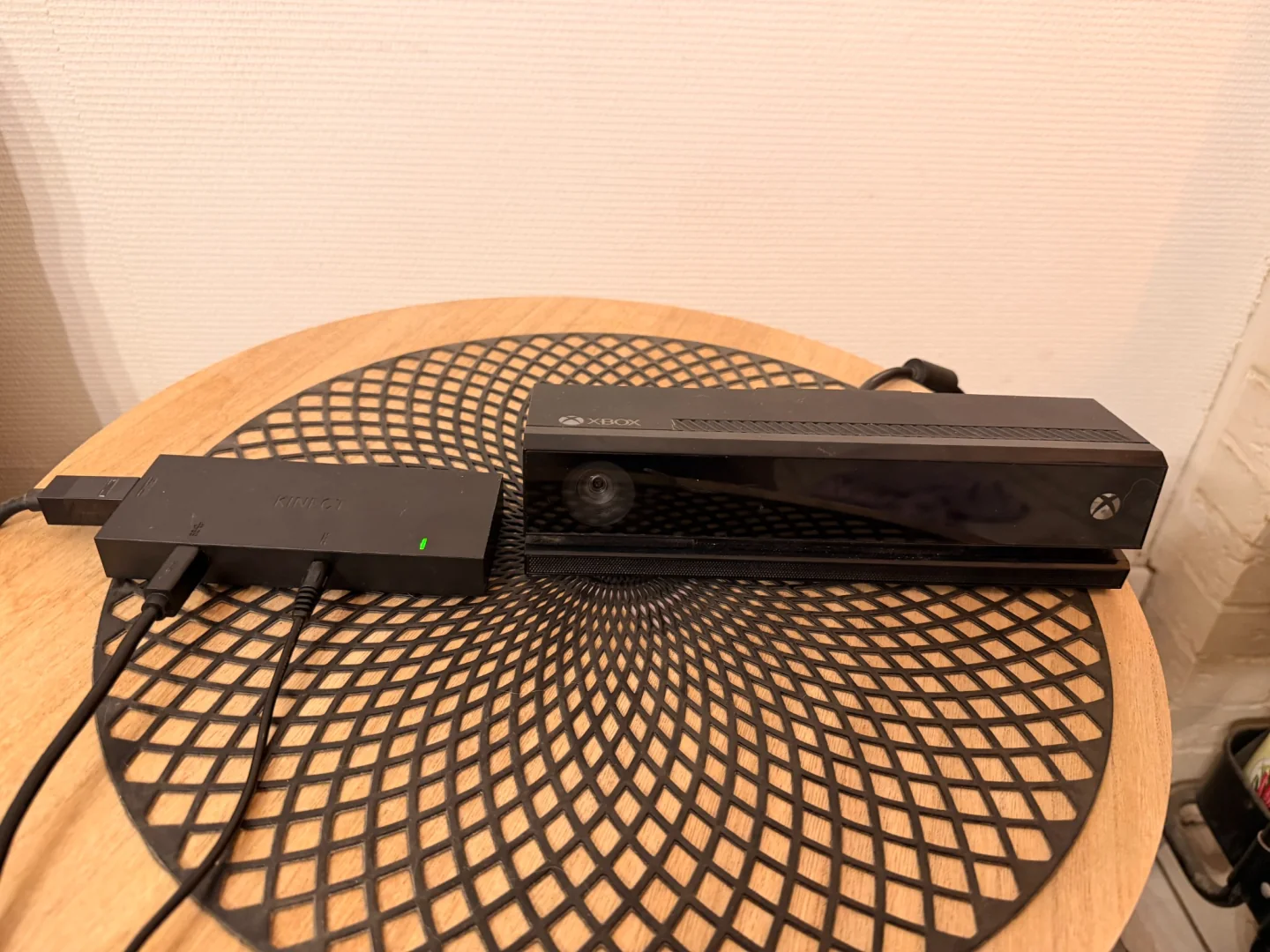
The Kinect v2 and its USB adapter, back in action after roughly a decade in storage.
Getting the Hardware Recognized
The Kinect v2 doesn’t use a standard USB connector. Fortunately, I still had the adapter that provides external power and a USB 3.0 connection.
My Mac doesn’t have USB-A ports, so I connected everything through a USB-C hub.
Then I checked whether macOS could see the device.
Nothing.
The driver’s USB guidance recommends a direct USB 3.0 connection when troubleshooting detection problems. I was already considering testing another adapter when I checked the cables one more time.
The USB cable wasn’t properly connected.
Well, that was an easy fix.
Once plugged in correctly, the macOS USB registry finally showed:
USB Product Name = "Xbox NUI Sensor"
USB Vendor Name  = "Microsoft"
idVendor         = 1118
idProduct        = 708
Those decimal identifiers correspond to Microsoft’s 0x045e vendor ID and the
Kinect v2’s 0x02c4 product ID.
The hardware was detected. Of course, enumeration doesn’t guarantee that a device can actually stream data.
For that, I needed a driver.
libfreenect2 to the Rescue
Microsoft’s original SDK targets Windows, but the OpenKinect community developed libfreenect2, an open-source driver for the Kinect v2.
I found an interesting fork, libfreenect2-metal, which supports Apple Silicon and provides a Metal-based depth-processing pipeline.
That last part matters.
The Kinect sends raw sensor data over USB. Reconstructing useful depth images involves additional processing, and libfreenect2 provides several backends for that work.
On my M4 Pro, Metal is the natural candidate.
The project also includes Protonect, a sample application that displays the
camera’s RGB, infrared, and depth output.
Rather than immediately writing my own application, I wanted that reference implementation working first.
A Successful Build Isn’t Always a Successful Configuration
With CMake, Ninja, libusb, GLFW and TurboJPEG available in a native arm64
environment, I cloned the repository and configured it with CMake. The macOS
build guide covers the prerequisites. The driver revision used
here is 600cef5.
git clone https://github.com/hbmartin/libfreenect2-metal.git
cd libfreenect2-metal
git checkout 600cef5283121fe37f166423c0e11c7e8a184309

cmake -S . -B build -G Ninja \
  -DCMAKE_BUILD_TYPE=Release \
  -DENABLE_METAL=ON

cmake --build build
The build completed successfully.
I launched Protonect with the Metal backend:
./build/bin/Protonect metal
And immediately got:
Requested pipeline 'metal' is not compiled into Protonect.
Interesting.
I had explicitly enabled Metal, and CMake hadn’t failed. Checking its cache confirmed the option was set:
ENABLE_METAL:BOOL=ON
So why wasn’t the backend available?
The answer was in the project’s CMake configuration.
Enabling a feature and satisfying its build requirements are two different things. The Metal backend is conditional on having a usable shader compiler.
And with Xcode 26, that compiler isn’t necessarily installed alongside the rest of the developer tools.
The Missing Metal Toolchain
With Xcode 26, the Metal Toolchain is an additional component. Apple documents how to download and install it.
The compiler launcher may exist even when the component needed to execute it hasn’t been downloaded.
The libfreenect2-metal build checks whether the compiler actually works. If that check fails, Metal processing can be disabled while the rest of the project still builds.
That explained the successful compilation and the missing backend.
The relevant checks are:
xcode-select -p
xcodebuild -version
xcrun -sdk macosx metal -v
If full Xcode is installed but the Metal Toolchain is missing, Apple provides a command to install it:
xcodebuild -downloadComponent metalToolchain
The important detail is that the active developer directory must point to the intended Xcode installation rather than an incompatible standalone Command Line Tools setup.
Once the toolchain was available, I configured a fresh build directory.
cmake -S . -B build-metal -G Ninja \
  -DCMAKE_BUILD_TYPE=Release \
  -DENABLE_METAL=ON

cmake --build build-metal
This time, Metal was included.
There’s a useful lesson here that applies well beyond this particular project: a successful build tells you that the selected configuration compiled. It doesn’t necessarily tell you that every optional feature you requested made it into the executable.
For optional backends, I prefer verifying the resulting capability rather than trusting the configuration flag alone.
First, the CPU Pipeline
Before I had resolved the Metal issue, I tried another experiment:
./build/bin/Protonect cpu
And it worked.
The viewer opened with images from the Kinect.
That was a useful diagnostic result. The sensor was alive, macOS could communicate with it, and libfreenect2 was able to retrieve and process its data.
My remaining problem was specific to Metal, rather than the entire acquisition chain.
This is one reason I like keeping a simpler fallback around when dealing with hardware. It gives you a working reference while investigating the more complicated path.
Finally, Running on the M4 Pro
With the Metal-enabled build ready, I tried again:
./build-metal/bin/Protonect metal
The logs now contained the line I was looking for:
MetalDepthPacketProcessor: using device Apple M4 Pro
There was one last USB hiccup. The driver temporarily couldn’t claim the sensor’s control interface, even though no other Protonect process was running.
Disconnecting and reconnecting the Kinect cleared it.
Then the viewer opened, this time with Metal selected.
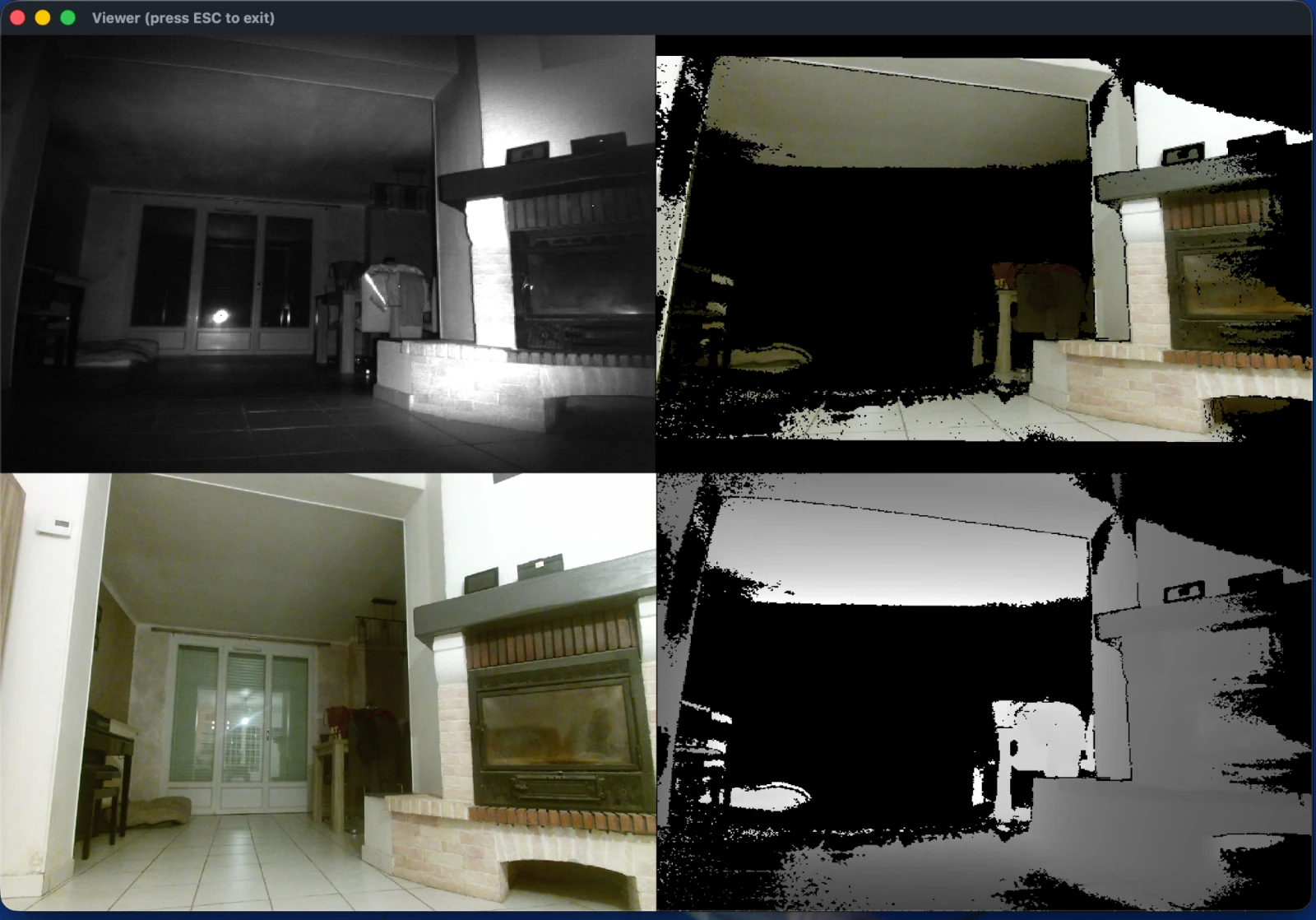
Protonect with Metal selected on my M4 Pro: infrared at top left, registered color at top right, RGB at bottom left, and depth at bottom right. Registered color maps the RGB image onto the depth image.
The image makes the distinction between an ordinary camera and a depth sensor obvious.
The RGB image shows the scene as we normally see it. The infrared view shows reflected infrared light; the depth view represents distances rather than visible colors. The registered color view combines RGB with depth, leaving holes where usable measurements are missing.
In broad terms, the processing path looks like this:
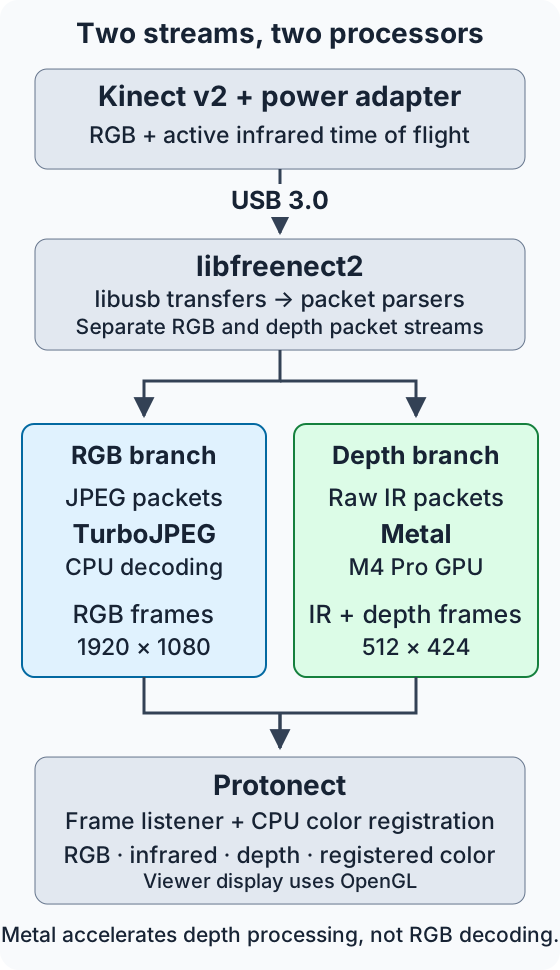
The branches run separately inside libfreenect2’s packet pipeline. In this build, TurboJPEG decodes RGB on the CPU, while the Metal depth processor produces infrared and depth frames on the GPU. Protonect receives those frames and registers color to depth before displaying them. Selecting Metal does not move RGB decoding or color registration onto that depth-processing backend.
There’s something particularly satisfying about seeing a sensor from 2013 working with a modern Apple GPU.
The Kinect doesn’t know or care what machine is on the other end of that USB cable. As long as the protocol is understood and the data can be processed, it still has plenty to offer.
The Beginning of Kinect Lab
Getting Protonect working was enough to prove the hardware could be reused.
It also made me want to go further.
I’ve started a small open-source project called Kinect Lab, built primarily in Rust, using the existing C++ driver and its Metal pipeline.
The aim is to experiment with the Kinect’s depth data, reconstruct 3D point clouds, and eventually explore more interactive uses.
There are still rough edges. In later capture experiments, for example, the
driver reported LIBUSB_ERROR_NO_DEVICE while releasing a USB interface
during shutdown, even after successfully streaming frames. I haven’t
established the cause, and I’m keeping that behavior visible rather than
silently treating it as a clean shutdown.
But the important part is already working.
A thirteen-year-old Kinect is streaming RGB, infrared, and depth data on an M4 Pro, with GPU-accelerated depth processing.
Next comes turning those depth measurements into something I can explore in three dimensions.
That deserves its own article.
For now, I’m rather glad I never threw this thing away.
Comments, questions, or just a reaction?
Send an email to ~bounga/bounga.org-discuss@lists.sr.ht. It is public and archived, so other readers can follow along and answer too.